Übersichtskarte – Lenovo Businessgeräte
Übersichtskarte – Lenovo Workstations
Zur Unterstützung der
Regionale Erneuerbare Energiegemeinschaft [EEG]
dorf.saft Kernland / fanny-Kremstal / Kamptal / Wachau / Priel

Tarifinformation Q1/2026 / dorf.saft Energiegemeinschaft:
Für Q1/2026 werden die aktuell gültigen Tarife unverändert beibehalten.
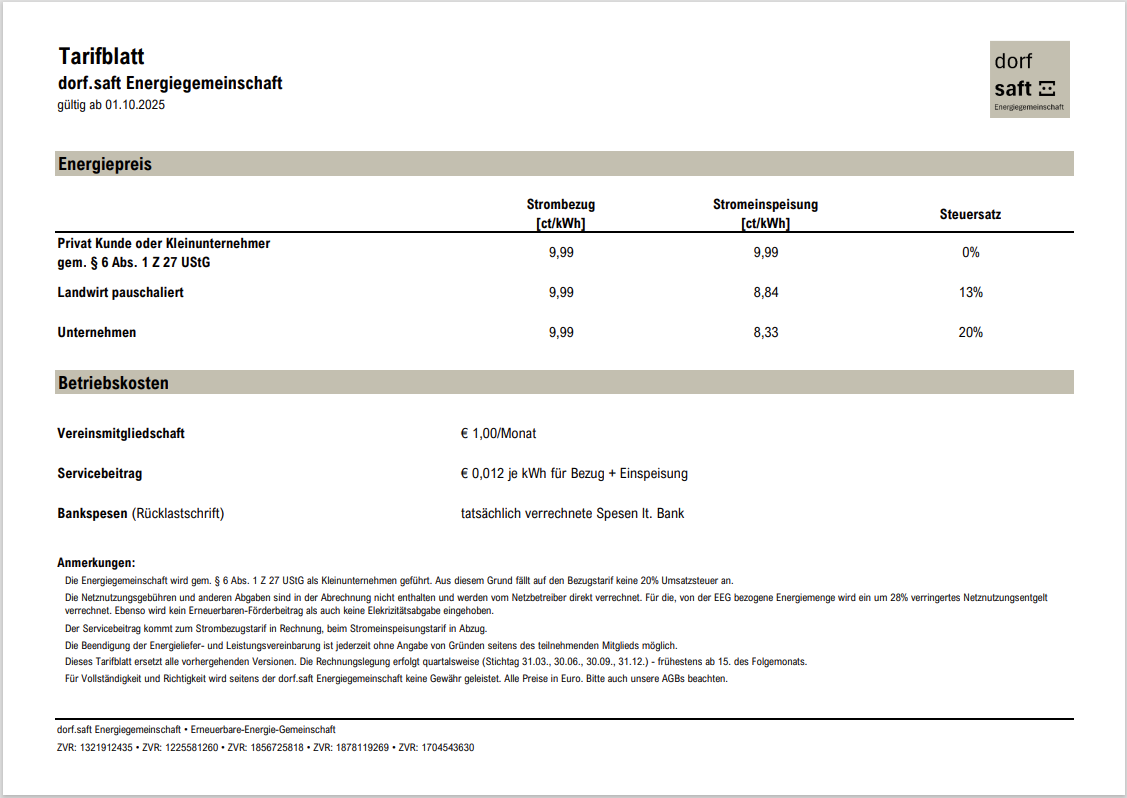
Tarifblatt Q4.2025 – dorf.saft Energiegemeinschaft
Tarifblatt Q3.2025 – dorf.saft Energiegemeinschaft
Tarifblatt Q2.2025 – dorf.saft Energiegemeinschaft
Beitrittserklärung – dorf.saft Energiegemeinschaft
AGB – dorf.saft Energiegemeinschaft
Vereinsregisterauszug – dorf.saft Kamptal
Quelle: Link
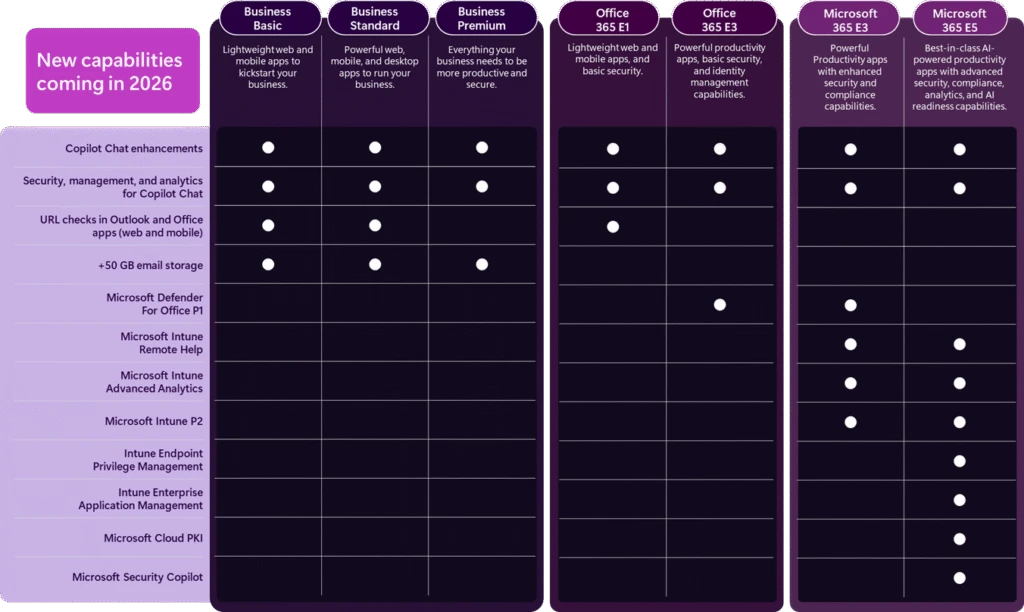
To understand the full value of our Business, Office, and Enterprise suites, view the webpages for details. The table below summarizes the new capabilities that we’re adding to the Microsoft 365 offerings.
The following list price changes will go into effect on July 1, 2026.5
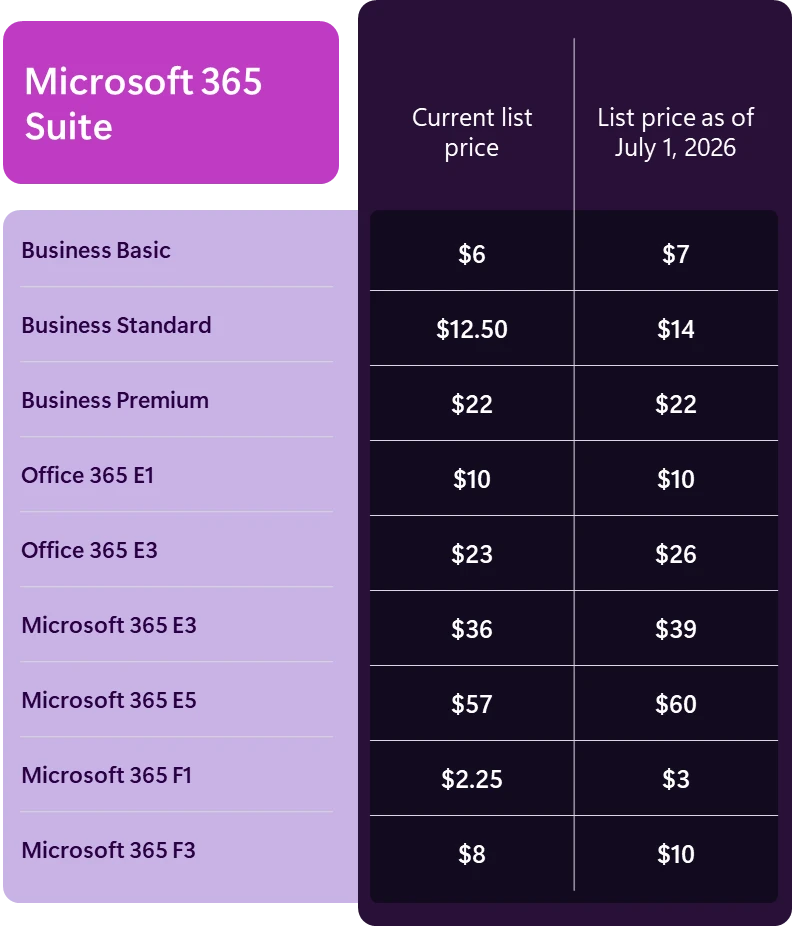
The changes will apply globally with local market adjustments for our commercial products and nonprofit pricing will be adjusted in line with commercial pricing.6 In addition to commercial products, today we also announced changes to the Microsoft 365 Government Suites. Learn more in the Government blog.
Quelle: Link
Overview
This licensing guide is for people who want to gain a basic understanding of how Microsoft® SQL Server® 2025 database software is licensed through Microsoft Commercial Licensing programs. This guide does not supersede or replace any of the legal documentation covering SQL Server 2025 use rights. Specific product license terms are defined in the Product Terms or in your commercial license agreement. This licensing guide is not a legal use rights document. Program specifications and business rules are subject to change.
SQL Server 2025 has two main commercial editions to accommodate the unique feature, performance and price requirements of organizations and individuals: Enterprise Edition and Standard Edition.
Other specialty editions of SQL Server 2025 include Enterprise Developer edition, Standard Developer edition, Evaluation edition (which are licensed for non-production use only), and Express edition. SQL Server Web edition is not available for 2025, however SQL Server 2022 Web edition may be available under the Microsoft Services Provider License Agreement (SPLA).
1. A software subscription license is a license to run the SQL Server software during the period of the subscription from your Commercial Licensing agreement. For example, you can acquire SQL Server software subscription licenses for 1-year or 3-year terms from a Cloud Solution Provider (CSP) partner.
You can license SQL Server from Microsoft in the following ways:
The remainder of this licensing guide discusses licensing through a Commercial Licensing Program (#1 above).
SQL Server 2025 empowers you to accelerate time-to-market for your AI application development with:
You get the most from your SQL Server licenses if you acquire them with Software Assurance or as subscription licenses.
Overview of Software Assurance and subscription licenses benefits
| Benefit | Description |
|---|---|
| Azure Hybrid Benefit | Azure Hybrid Benefit for SQL Server is an Azure-based benefit available with SA or software subscription licenses, allowing customers to use their existing SQL Server licenses to access SQL services on Azure at a reduced cost. |
| New version rights | You gain access to new versions as soon as they are released. |
| Fail-Over servers for disaster recovery | Allows you to run passive SQL Server instances in a separate OSE or server for disaster recovery in anticipation of a failover event. |
| Fail-Over servers for disaster recovery in Azure | Allows you to run passive SQL Server instances in a separate OSE or server for disaster recovery in Azure in anticipation of a failover event |
| Fail-Over servers for high availability | Allows you to run passive SQL Server instances in a separate OSE or server for high availability in anticipation of a failover event. |
| Unlimited virtualization with Enterprise edition | Allows you to run any number of instances in an unlimited number of VMs when you license a full physical Server with Enterprise edition. With this benefit you do not need to license each VM separately. Applicable under the per core licensing model only. Unlimited virtualization with Enterprise edition is also available with SQL Server enabled by Azure Arc. |
| Unlimited containers | Allows you to run any number of containers in a virtual Operating System Environment (OSE) when you license a virtual OSE with virtual OSE licensing. With this benefit you do not need to license each container separately. Available for Standard or Enterprise licenses. Applicable under the per core licensing model only. |
| Flexible Virtualization Benefit | Allows you to run SQL Server on Authorized Outsourcers’ servers (shared or dedicated) under expanded Outsourcing Software Management rights.
Notwithstanding the Outsourcing Software Management clause, you may use SQL Server enabled by Azure Arc with a pay-as-you-go subscription on your own devices, or devices under the day-to-day management and control of third parties. However, when using SQL Server enabled by Azure Arc with a) a license with SA, b) a subscription license, or c) physical core licensing with unlimited virtualization under a pay-as-you-go subscription, you are only permitted to run SQL Server enabled by Azure Arc on your own devices or Servers under the day-to-day management and control of Authorized Outsourcers, regardless of whether those Servers are dedicated to Customer. |
| Power BI Report Server | With SQL Server 2025, customers using Enterprise or Standard editions (even without active Software Assurance) are permitted to run Power BI Report Server without purchasing additional licenses. For versions of SQL Server Enterprise Edition released prior to 2025, Power BI Report Server use rights apply only to Enterprise Edition Core Licenses with active SA. This right expires upon expiration of Customer’s SA coverage. |
| Option to license by virtual machine | Allows you to license SQL Server 2025 by virtual machine. You may also move your virtual machine as often as needed to another server in the same server farm. |
| License Mobility
(Available with Software Assurance only) |
Allows you to run SQL Server on an Authorized License Mobility Partner’s shared servers. Does not apply to SQL Server PDW. Unlimited virtualization rights and unlimited container rights do not apply when using Licensing Mobility. License Mobility is available with Software Assurance only. |
There are two licensing models for SQL Server: Per Core and Server + CAL.
The Server + CAL licensing model provides the option to license users and/or devices and have low-cost access to incremental SQL Server deployments. For customers who cannot count users or require premium database capabilities, a core-based licensing model may work better. Core-based licensing gives customers a more precise measure of computing power and a more consistent licensing metric, regardless of whether solutions are deployed on physical on-premises servers, or in virtual or cloud environments.
| Edition | Server + CAL | Per Core |
|---|---|---|
| Enterprise | X | |
| Standard | X | X |
Under the Per Core licensing model, devices or virtual machines running SQL Server or its components must have an appropriate number of SQL Server core licenses assigned based on the number of physical cores when licensing a physical server, or virtual cores when licensing a virtual machine. Unlike the Server + CAL model, unlimited users and devices can access SQL Server under this model without Client Access Licenses (CALs). SQL Server core SKUs are sold in packs of two-core licenses each. Meaning a single two-core SKU includes two core licenses.
There are two ways of counting licenses, depending on whether you are licensing per physical server or licensing per virtual machine. Note that Software Assurance (SA) or a subscription license is required to license by virtual machine.
You must acquire sufficient licenses based on the number of physical cores on the server, with a minimum of four Licenses per Physical Processor.

Use entitlements WITHOUT Software Assurance or subscription license:
Additional Enterprise edition use entitlements with Software Assurance or subscription license: Enterprise edition customers with SA or subscription licenses can run any number of instances of SQL Server in an unlimited number of OSEs (physical or virtual) on the server. (Note that this entitlement may not be used in conjunction with License Mobility.)
You must acquire sufficient licenses based on the number of virtual cores in the virtual OSE, with a minimum of four licenses per virtual OSE. If any virtual core is mapped to multiple hardware threads, you must also license each hardware thread to which it is mapped. The 32-core limit for the Standard edition means 32 hardware threads. Only licenses with Software Assurance or subscription licenses are eligible for this license model. (Note: a container is also considered a virtual OSE. The only exception is when using the unlimited container benefit described below.)

Enterprise edition permits running any number of instances of SQL Server in the licensed virtual OSE or in an unlimited number of containers only in the licensed virtual OSE.
Standard edition permits running any number of instances of SQL Server in the licensed virtual OSE or in an unlimited number of containers only in the licensed virtual OSE.
Note: For the purposes of licensing, the only time containers are not considered to be virtual OSEs is when using the unlimited container use right. For example, without SA or subscription licenses, you are allowed unlimited instances only in the single VM or container (both considered a “virtual OSE”) that is licensed. With SA or a subscription license, however, you may then run unlimited instances in unlimited containers within your licensed VM or container.
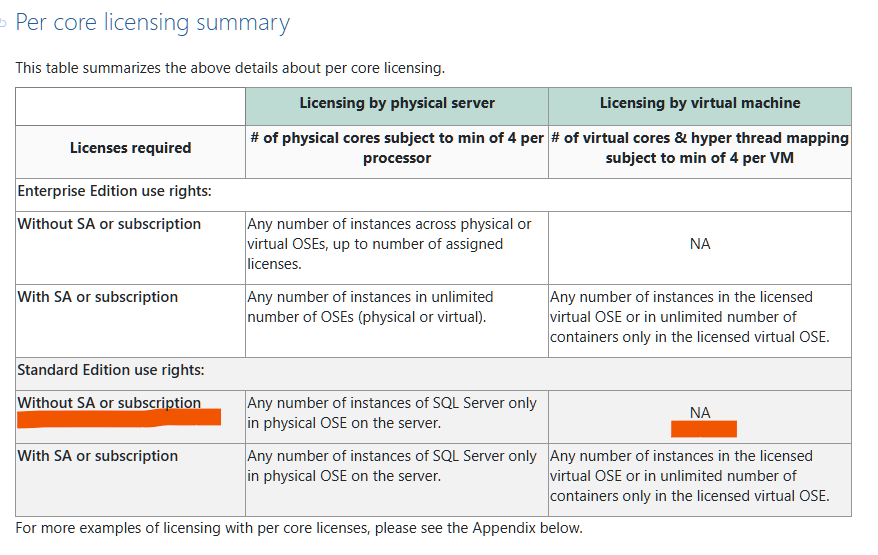
This table summarizes the above details about per core licensing.
| Licensing by physical server | Licensing by virtual machine | |
| Licenses required | # of physical cores subject to min of 4 per processor | # of virtual cores & hyper thread mapping subject to min of 4 per VM |
| Enterprise Edition use rights: | ||
| Without SA or subscription | Any number of instances across physical or virtual OSEs, up to number of assigned licenses. | NA |
| With SA or subscription | Any number of instances in unlimited number of OSEs (physical or virtual). | Any number of instances in the licensed virtual OSE or in unlimited number of containers only in the licensed virtual OSE. |
| Standard Edition use rights: | ||
| Without SA or subscription | Any number of instances of SQL Server only in physical OSE on the server. | NA |
| With SA or subscription | Any number of instances of SQL Server only in physical OSE on the server. | Any number of instances in the licensed virtual OSE or in unlimited number of containers only in the licensed virtual OSE. |
For more examples of licensing with per core licenses, please see the Appendix below.
Under the Server + CAL model for licensing SQL Server Standard edition, you acquire a server license for each server and a Client Access License (CAL) for each user or device accessing the SQL Server or any of its components.

You may run one instance of SQL Server in a single physical OSE or virtual OSE for each server license acquired. (Note: a container is also considered a virtual OSE.) You may also stack server licenses on a device to increase your allowed instances & OSEs.
Quelle: Link
Montag, 24. November 2025
Microsoft hat auf der Ignite 2025 die offizielle Verfügbarkeit von SQL Server 2025 bekanntgegeben. Die neue Version setzt auf bewährte Sicherheit, Performance und hohe Verfügbarkeit und erweitert diese Basis erstmals um tief in die Datenbank integrierte KI-Funktionen. Hier findest du die zentralen Neuerungen kompakt zusammengefasst.
SQL Server 2025 bringt KI-Funktionen unmittelbar in die Datenbank-Engine. Damit kannst du Modelle verwalten, Vektoren erzeugen, semantische Suche nutzen und RAG-Szenarien direkt in T-SQL umsetzen.
Unterstützt werden u. a. Microsoft Foundry, Azure OpenAI Service, OpenAI-Modelle, Ollama sowie Frameworks wie LangChain und Semantic Kernel. Modellwechsel funktionieren ohne Codeänderung.
Die neue Version gilt als das größte Developer-Update seit zehn Jahren. Neu sind u. a.:
SQL Server 2025 erweitert moderne Sicherheitsmechanismen, u. a. durch Microsoft Entra Managed Identities. Die Performanceverbesserungen umfassen:
SQL Server 2025 unterstützt Fabric Mirroring, wodurch nahezu Echtzeit-Analytics ohne ETL möglich werden. Azure Arc sorgt für einheitliche Verwaltung über On-Premises, Cloud und Hybrid hinweg.
Für den Einsatz von SQL Server 2025 auf Linux bringt die neue Version:
SQL Server 2025 läuft auf spezialisierten VM-Serien und bietet:
SQL Server 2025 markiert einen deutlichen Technologiesprung: KI wird nativ, Developer erhalten mehr Freiheiten, Sicherheit und Performance steigen, und hybride Szenarien werden einfacher. Damit positioniert sich SQL Server 2025 als durchgängig einsetzbare Datenplattform – im Rechenzentrum, in der Cloud und in Container-Umgebungen.
Quelle: Link

 Microsoft
Image: Introducing Microsoft 365 Copilot Business
For the best value and to simplify purchasing, we’re taking it even further to help get you started by bundling Copilot Business with qualifying Microsoft 365 Business plans. Choose the best plan for your team:
These bundles will be available on both Microsoft.com and through Microsoft Partners beginning December 1, 2025.
Quelle: Link
Important
Update Channel Changes Coming July 2025: Microsoft is making significant changes to update channels beginning July 2025:
The following table provides a comparison of Current Channel, Monthly Enterprise Channel, and Semi-Annual Enterprise Channel.
| Category | Current Channel | Monthly Enterprise Channel | Semi-Annual Enterprise Channel |
|---|---|---|---|
| Recommended use | Provide your users with new Microsoft 365 Apps features as soon as they’re ready, but on no set schedule. | Provide your users with new Microsoft 365 Apps features only once a month and on a predictable schedule. | For non-interactive devices and those running specialized or business-critical workloads that require extensive testing before new Microsoft 365 Apps features are implemented. Suitable for select devices performing automated tasks where end-users aren’t present, ensuring compliance with regulatory and organizational standards. |
| Release frequency1 | At least once a month (likely more often), but on no set schedule | Once a month, on the second Tuesday of the month | Once a month, on the second Tuesday of the month |
| Feature updates2 | As soon as they’re ready (once a month), but on no set schedule | Once a month, on the second Tuesday of the month | Twice a year (in January and July), on the second Tuesday of the month |
| Security updates3
(if needed) |
Once a month, on the second Tuesday of the month | Once a month, on the second Tuesday of the month | Once a month, on the second Tuesday of the month |
| Non-security updates2
(if needed) |
Usually at least once a month (possibly more often), but no set schedule | Once a month, on the second Tuesday of the month | Once a month, on the second Tuesday of the month |
| Support duration for a given version4 | Until the next version is released with new features, which is usually about one month | Two months | Eight months (Beginning July 2025; previously fourteen months) |
| Rollback support5 | Not applicable | Two months (Beginning July 2025; previously one month) | Two months (Beginning July 2025) |
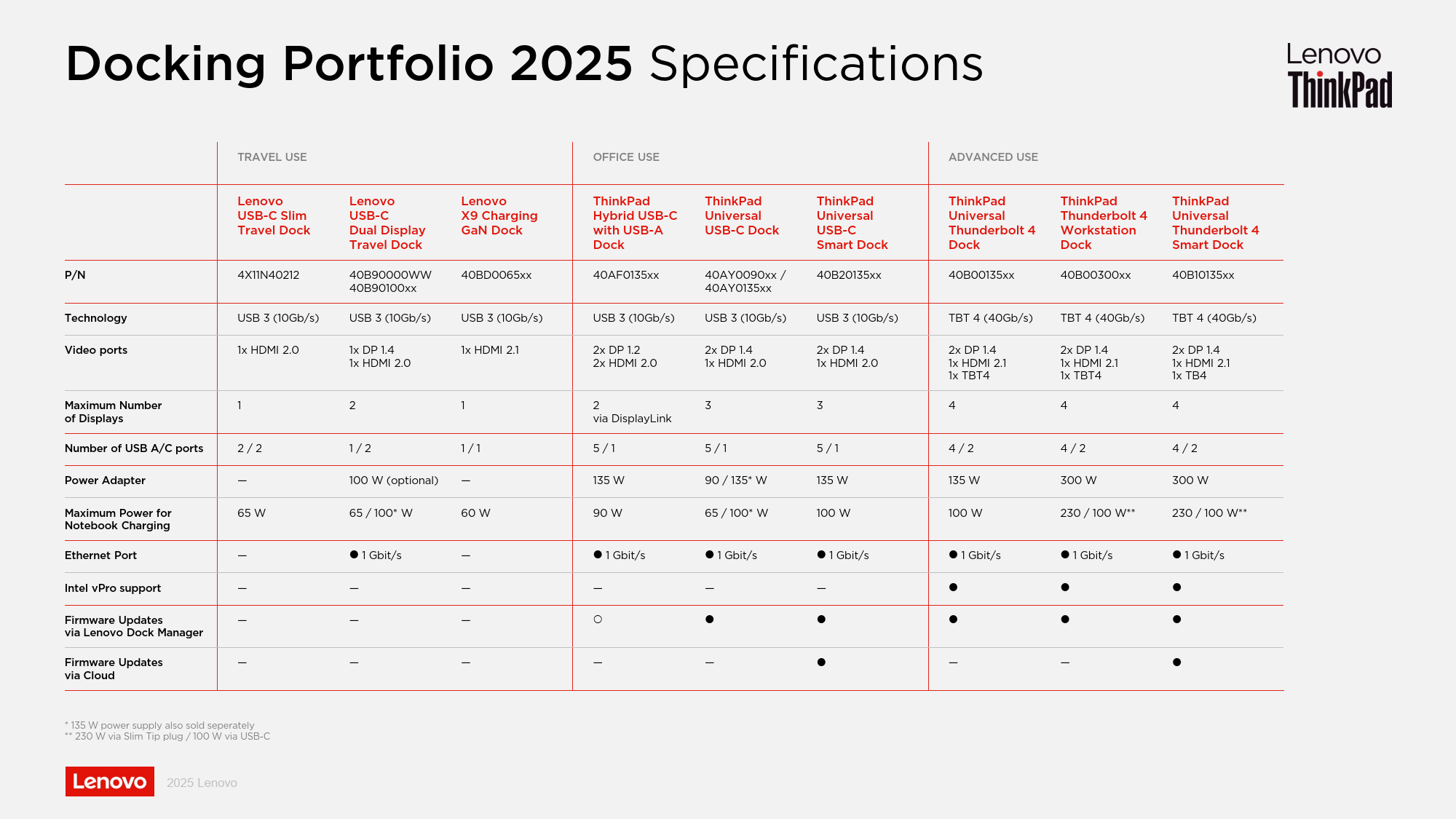
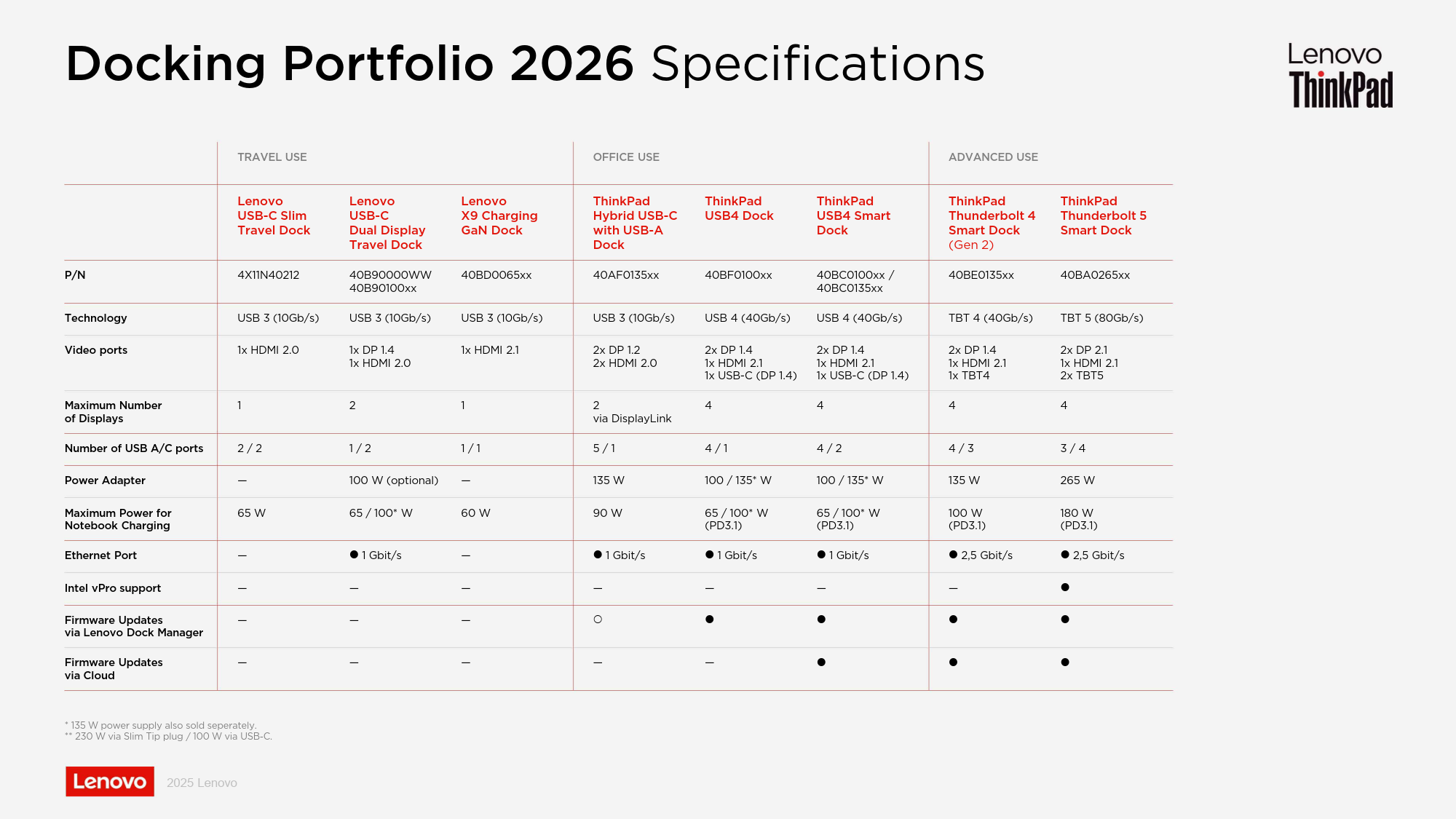
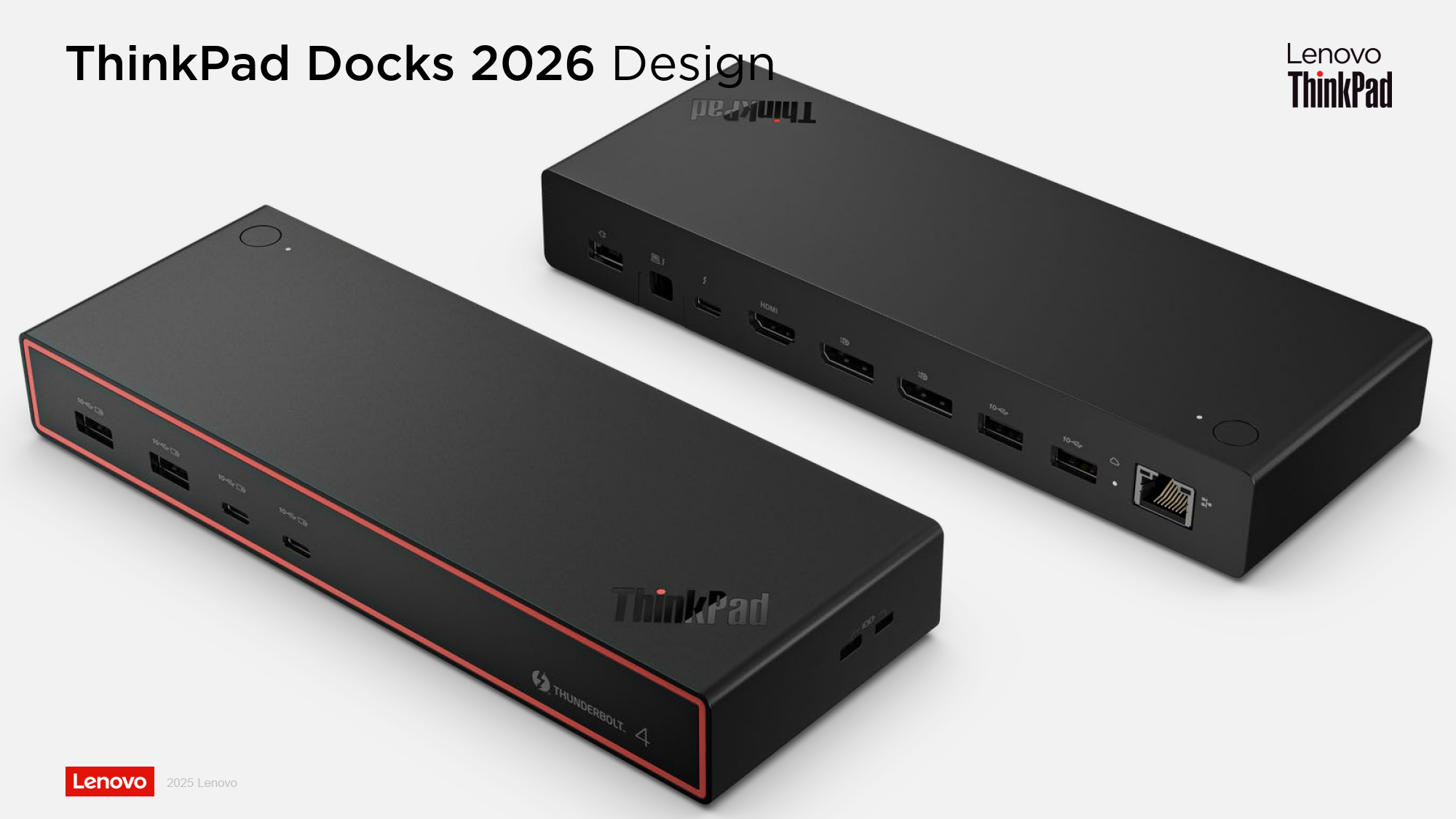
Quelle: Link
Switch port flow control is a critical feature for managing network congestion and ensuring smooth data transmission across the network. This article provides a comprehensive overview of switch port flow control, its benefits, and how to enable it on Zyxel switches.
Every switch has a hardware buffer, also known as a packet buffer. This buffer temporarily stores traffic during congestion to prevent packet loss. The size of the packet buffer varies by switch model. For example, the XGS 2220 has a packet buffer size of 2 megabytes.
Network congestion can occur due to two main reasons:
Ethernet flow control allows switches to send and process pause frames to manage traffic and prevent packet loss. When the packet buffer reaches a certain threshold, the switch sends a pause frame to the sending device to temporarily halt data transmission.
The primary benefit of flow control is to prevent packet loss during periods of congestion. While it introduces a small amount of latency, this is generally preferable to the higher latency and retransmission overhead caused by packet loss.
To enable flow control on a Zyxel switch:
While flow control can prevent packet loss, it should not be enabled on all ports indiscriminately. Consider the following best practices:
Flow control is a valuable tool for managing network congestion and ensuring efficient data transmission. By understanding how it works and implementing it strategically, you can improve the performance and reliability of your network.


 Zyxel Employee