Quelle: Link
Overview
This licensing guide is for people who want to gain a basic understanding of how Microsoft® SQL Server® 2025 database software is licensed through Microsoft Commercial Licensing programs. This guide does not supersede or replace any of the legal documentation covering SQL Server 2025 use rights. Specific product license terms are defined in the Product Terms or in your commercial license agreement. This licensing guide is not a legal use rights document. Program specifications and business rules are subject to change.
SQL Server 2025 editions
SQL Server 2025 has two main commercial editions to accommodate the unique feature, performance and price requirements of organizations and individuals: Enterprise Edition and Standard Edition.
- Enterprise Edition is ideal for applications requiring mission critical in-memory performance, security, and high availability. Enterprise edition also offers unlimited virtualization rights when acquired with Software Assurance or through a software subscription license from your Commercial Licensing agreement [1].
- Standard Edition is designed for small to medium-sized business and organizations. It provides many of the core database features of Enterprise edition, but with limitations on scalability and high availability. It is a cost-effective option for businesses that require a reliable and scalable database solution but do not need the advanced features and scalability of Enterprise edition. The Standard Edition’s maximum compute capacity is limited to 32 licensed cores.
Other specialty editions of SQL Server 2025 include Enterprise Developer edition, Standard Developer edition, Evaluation edition (which are licensed for non-production use only), and Express edition. SQL Server Web edition is not available for 2025, however SQL Server 2022 Web edition may be available under the Microsoft Services Provider License Agreement (SPLA).
- For detailed product specifications and a full feature-by-feature comparison of the SQL Server editions, visit https://aka.ms/sqlserver2025editions.
- For more information on the compute capacity limits for each edition of SQL Server, visit http://aka.ms/sqlcapacitylimits.
1. A software subscription license is a license to run the SQL Server software during the period of the subscription from your Commercial Licensing agreement. For example, you can acquire SQL Server software subscription licenses for 1-year or 3-year terms from a Cloud Solution Provider (CSP) partner.
How to buy
You can license SQL Server from Microsoft in the following ways:
- Commercial licensing agreement: You can license SQL Server through a commercial licensing agreement by working with a Microsoft partner or Microsoft directly. Learn about commercial licensing agreement options.
- Pay-as-you-go billing for SQL Server enabled by Azure Arc: SQL Server enabled by Azure Arc provides pay-as-you-go flexibility across on-premises and cloud environments. SQL Server pay-as-you-go subscription includes a set of benefits like that included with a license with Software Assurance or a subscription license. Learn more about how to use pay-as-you-go licensing. To learn more about outsourcing, unlimited virtualization, and failover rights, please see the related Product Terms.
- Pay-as-you-go billing for Azure SQL: Azure SQL is a family of managed, secure, and intelligent products that use the SQL Server database engine in the Azure cloud. Learn more about licensing SQL through Azure.
The remainder of this licensing guide discusses licensing through a Commercial Licensing Program (#1 above).
SQL Server 2025 new features
SQL Server 2025 empowers you to accelerate time-to-market for your AI application development with:
- Built-in AI support to combine vector and keyword search in a single engine. You can access the AI models you choose using the familiar T-SQL language.
- Native JSON support, REST APIs, and other tools to help developers build AI apps consistently across cloud and on-premises environments.
- Frictionless analytics and cloud agility using near real-time data replication with database mirroring in Fabric and centralized management using Azure Arc.
- Security with Microsoft Entra ID for authentication, optimized locking for improved concurrency, and faster query processing for better performance.
Software Assurance or subscription licenses
You get the most from your SQL Server licenses if you acquire them with Software Assurance or as subscription licenses.
- Software Assurance (SA) is a comprehensive Volume Licensing benefit program that includes an extensive set of technologies, services, rights, and benefits to help customers get the most out of their Microsoft investments. SA is a supplemental program that can only be added to perpetual licenses at the time of purchase and cannot be acquired later.
- Software subscription licenses permit you to run the SQL Server software during the period of the subscription from your Commercial Licensing agreement. For example, you can acquire SQL Server software subscription licenses for 1-year or 3-year terms from a Cloud Solution Provider (CSP) partner. Software subscription licenses include similar benefits to licenses with Software Assurance. (Note: software subscription licenses are not the same thing as Azure subscriptions. But you can use your software subscription licenses (or licenses with SA) for SQL resources on Azure with the Azure Hybrid Benefit, or on-prem but connected to Azure via Azure Arc)
Overview of Software Assurance and subscription licenses benefits
| Benefit | Description |
|---|---|
| Azure Hybrid Benefit | Azure Hybrid Benefit for SQL Server is an Azure-based benefit available with SA or software subscription licenses, allowing customers to use their existing SQL Server licenses to access SQL services on Azure at a reduced cost. |
| New version rights | You gain access to new versions as soon as they are released. |
| Fail-Over servers for disaster recovery | Allows you to run passive SQL Server instances in a separate OSE or server for disaster recovery in anticipation of a failover event. |
| Fail-Over servers for disaster recovery in Azure | Allows you to run passive SQL Server instances in a separate OSE or server for disaster recovery in Azure in anticipation of a failover event |
| Fail-Over servers for high availability | Allows you to run passive SQL Server instances in a separate OSE or server for high availability in anticipation of a failover event. |
| Unlimited virtualization with Enterprise edition | Allows you to run any number of instances in an unlimited number of VMs when you license a full physical Server with Enterprise edition. With this benefit you do not need to license each VM separately. Applicable under the per core licensing model only. Unlimited virtualization with Enterprise edition is also available with SQL Server enabled by Azure Arc. |
| Unlimited containers | Allows you to run any number of containers in a virtual Operating System Environment (OSE) when you license a virtual OSE with virtual OSE licensing. With this benefit you do not need to license each container separately. Available for Standard or Enterprise licenses. Applicable under the per core licensing model only. |
| Flexible Virtualization Benefit | Allows you to run SQL Server on Authorized Outsourcers’ servers (shared or dedicated) under expanded Outsourcing Software Management rights.
Notwithstanding the Outsourcing Software Management clause, you may use SQL Server enabled by Azure Arc with a pay-as-you-go subscription on your own devices, or devices under the day-to-day management and control of third parties. However, when using SQL Server enabled by Azure Arc with a) a license with SA, b) a subscription license, or c) physical core licensing with unlimited virtualization under a pay-as-you-go subscription, you are only permitted to run SQL Server enabled by Azure Arc on your own devices or Servers under the day-to-day management and control of Authorized Outsourcers, regardless of whether those Servers are dedicated to Customer. |
| Power BI Report Server | With SQL Server 2025, customers using Enterprise or Standard editions (even without active Software Assurance) are permitted to run Power BI Report Server without purchasing additional licenses. For versions of SQL Server Enterprise Edition released prior to 2025, Power BI Report Server use rights apply only to Enterprise Edition Core Licenses with active SA. This right expires upon expiration of Customer’s SA coverage. |
| Option to license by virtual machine | Allows you to license SQL Server 2025 by virtual machine. You may also move your virtual machine as often as needed to another server in the same server farm. |
| License Mobility
(Available with Software Assurance only) |
Allows you to run SQL Server on an Authorized License Mobility Partner’s shared servers. Does not apply to SQL Server PDW. Unlimited virtualization rights and unlimited container rights do not apply when using Licensing Mobility. License Mobility is available with Software Assurance only. |
SQL Server licensing models
There are two licensing models for SQL Server: Per Core and Server + CAL.
- Per core licensing is available for both editions. Under this model, you acquire licenses for the number of cores running on the device or virtual machine. There are no licenses needed for users or devices that access the SQL Server.
- Server + CAL licensing is only available with Standard edition and is not available with Pay-as-you-go billing. Under this model you acquire both a “server” license for the device that will run SQL Server and a “Client Access License (CAL)” for each user or device that will access the SQL Server.
The Server + CAL licensing model provides the option to license users and/or devices and have low-cost access to incremental SQL Server deployments. For customers who cannot count users or require premium database capabilities, a core-based licensing model may work better. Core-based licensing gives customers a more precise measure of computing power and a more consistent licensing metric, regardless of whether solutions are deployed on physical on-premises servers, or in virtual or cloud environments.
| Edition | Server + CAL | Per Core |
|---|---|---|
| Enterprise | X | |
| Standard | X | X |
Per Core licensing
Under the Per Core licensing model, devices or virtual machines running SQL Server or its components must have an appropriate number of SQL Server core licenses assigned based on the number of physical cores when licensing a physical server, or virtual cores when licensing a virtual machine. Unlike the Server + CAL model, unlimited users and devices can access SQL Server under this model without Client Access Licenses (CALs). SQL Server core SKUs are sold in packs of two-core licenses each. Meaning a single two-core SKU includes two core licenses.
There are two ways of counting licenses, depending on whether you are licensing per physical server or licensing per virtual machine. Note that Software Assurance (SA) or a subscription license is required to license by virtual machine.
Licensing by physical server
You must acquire sufficient licenses based on the number of physical cores on the server, with a minimum of four Licenses per Physical Processor.

Use entitlements when licensed by physical server under the Per Core model
Use entitlements WITHOUT Software Assurance or subscription license:
- Enterprise edition permits running any number of instances of SQL Server across physical or virtual Operating System Environments (OSEs) on your server, up to the number of assigned licenses. (Note: For the purposes of licensing, a container is also considered to be a virtual OSE). For example, if you assigned 16 core licenses to a server, you could run instances across up to 16 OSEs (physical or virtual). If you’d like to run instances on additional OSEs you can assign more licenses to the server. For example, by assigning 2 more licenses to a 16-core server you could run instances across 18 OSEs.
- Standard edition permits running any number of instances of SQL Server only in the physical OSE on the server.
Additional Enterprise edition use entitlements with Software Assurance or subscription license: Enterprise edition customers with SA or subscription licenses can run any number of instances of SQL Server in an unlimited number of OSEs (physical or virtual) on the server. (Note that this entitlement may not be used in conjunction with License Mobility.)
Licensing by virtual machine (Software Assurance or subscription license required)
You must acquire sufficient licenses based on the number of virtual cores in the virtual OSE, with a minimum of four licenses per virtual OSE. If any virtual core is mapped to multiple hardware threads, you must also license each hardware thread to which it is mapped. The 32-core limit for the Standard edition means 32 hardware threads. Only licenses with Software Assurance or subscription licenses are eligible for this license model. (Note: a container is also considered a virtual OSE. The only exception is when using the unlimited container benefit described below.)

Use entitlements when licensed by virtual machine under the Per Core model
Enterprise edition permits running any number of instances of SQL Server in the licensed virtual OSE or in an unlimited number of containers only in the licensed virtual OSE.
Standard edition permits running any number of instances of SQL Server in the licensed virtual OSE or in an unlimited number of containers only in the licensed virtual OSE.
Note: For the purposes of licensing, the only time containers are not considered to be virtual OSEs is when using the unlimited container use right. For example, without SA or subscription licenses, you are allowed unlimited instances only in the single VM or container (both considered a “virtual OSE”) that is licensed. With SA or a subscription license, however, you may then run unlimited instances in unlimited containers within your licensed VM or container.
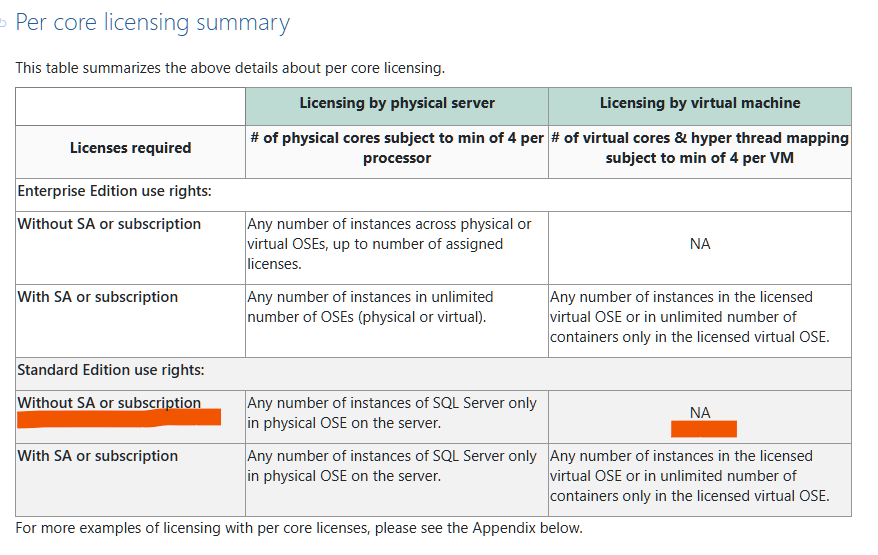
Per core licensing summary
This table summarizes the above details about per core licensing.
| Licensing by physical server | Licensing by virtual machine | |
| Licenses required | # of physical cores subject to min of 4 per processor | # of virtual cores & hyper thread mapping subject to min of 4 per VM |
| Enterprise Edition use rights: | ||
| Without SA or subscription | Any number of instances across physical or virtual OSEs, up to number of assigned licenses. | NA |
| With SA or subscription | Any number of instances in unlimited number of OSEs (physical or virtual). | Any number of instances in the licensed virtual OSE or in unlimited number of containers only in the licensed virtual OSE. |
| Standard Edition use rights: | ||
| Without SA or subscription | Any number of instances of SQL Server only in physical OSE on the server. | NA |
| With SA or subscription | Any number of instances of SQL Server only in physical OSE on the server. | Any number of instances in the licensed virtual OSE or in unlimited number of containers only in the licensed virtual OSE. |
For more examples of licensing with per core licenses, please see the Appendix below.
Server + CAL licensing
Under the Server + CAL model for licensing SQL Server Standard edition, you acquire a server license for each server and a Client Access License (CAL) for each user or device accessing the SQL Server or any of its components.
- A “server” is the physical hardware system. Any hardware partition or blade is considered a separate server.
- CALs are required even when the server is accessed indirectly. Additionally, all devices accessing SQL Server require a CAL, even if they are not attended to by a human. A user or device assigned a single CAL can access more than one licensed SQL Server. Note: Using hardware or software that reduces the number of devices or users that directly access or use the software (multiplexing/pooling) does not reduce the number of CALs required. Learn more about multiplexing.

Use entitlements when licensed under the Server + CAL model
You may run one instance of SQL Server in a single physical OSE or virtual OSE for each server license acquired. (Note: a container is also considered a virtual OSE.) You may also stack server licenses on a device to increase your allowed instances & OSEs.

