Strengthening Email Ecosystem: Outlook’s New Requirements for High‐Volume Senders

Quelle: Link

This applies to Outlook.com – our consumer service, which is supporting hotmail.com live.com and outlook.com consumer domain addresses.

Introduction

In an era where email remains one of the most widely used tools for personal and business communications, Outlook is stepping up its commitment to protect inboxes and preserve trust in the digital ecosystem. Today, we’re announcing new requirements and best practices designed to strengthen email authentication for domains sending more than 5,000 emails per day. 

These new requirements will enforce stricter standards by including mandatory SPF, DKIM, DMARC settings. Outlook is pushing the broader industry toward best practices and safeguarding the millions of individuals and small businesses that rely on us every day. These measures will help reduce spoofing, phishing, and spam activity, empowering legitimate senders with stronger brand protection and better deliverability. 

Outlook has always prioritized user safety and reliability; we’re proud to further invest in this solution that will keep our customers safe and reinforce the best practices across the industry. We believe that by raising the bar for large senders, we can inspire lasting change that benefits everyone. 

What’s Changing?

For domains sending over 5,000 emails per day, Outlook will soon require compliance with SPF, DKIM, DMARC. Non‐compliant messages will first be routed to Junk. If issues remain unresolved, they may eventually be rejected. Senders will soon start requiring compliance with the following requirements: 

  1. SPF (Sender Policy Framework)
    • Must Pass for the sending domain.
    • Your domain’s DNS record should accurately list authorized IP addresses/hosts.
  2. DKIM (DomainKeys Identified Mail)
    • Must Pass to validate email integrity and authenticity.
  3. DMARC (Domain-based Message Authentication, Reporting, and Conformance)
    • At least p=none and align with either SPF or DKIM (preferably both).

Learn more about email authentication here.

Additional Email Hygiene Recommendations

Large senders should also adopt these practices to maintain quality and trust:

  • Compliant P2 (Primary) Sender Addresses: Ensure the “From” or “Reply‐To” address is valid, reflects the true sending domain, and can receive replies. 
  • Functional Unsubscribe Links: Provide an easy, clearly visible way for recipients to opt out of further messages, particularly for marketing or bulk mail. 
  • List Hygiene & Bounce Management: Remove invalid addresses regularly to reduce spam complaints, bounces, and wasted messages. 
  • Transparent Mailing Practices: Use accurate subject lines, avoid deceptive headers, and ensure your recipients have consented to receive your messages. 

Outlook reserves the right to take negative action, including filtering or blocking—against non‐compliant senders, especially for critical breaches of authentication or hygiene. 

Enforcement Timeline

Starting today, we encourage all senders and particularly those that send at high volume to review and update their SPF, DKIM, and DMARC records, in preparation for when the enforcement begins, starting in May. 

After May 5th, 2025, Outlook will begin routing messages from high volume non‐compliant domains to the Junk folder, giving senders an opportunity to address any outstanding issues. NOTE: that in the future (date to be announced), non-compliant messages will be rejected to further protect users.   

Next Steps
  • Prepare Now: Audit your DNS records (SPF, DKIM, DMARC) and verify you meet all the requirements. To view the authentication header, visit this. To learn how to read authentication headers, click here. 
  • Stay Informed: We’ll provide updates on official rollout schedules, and dates for when rejection actions will begin through a blog post. 
  • Join Our Mission: Embracing better authentication and hygiene not only benefits your deliverability but also helps protect the entire email ecosystem. 

For additional resources or support, visit sender support. Thank you for partnering with us to make email a more secure, transparent, and trusted channel for everyone. 
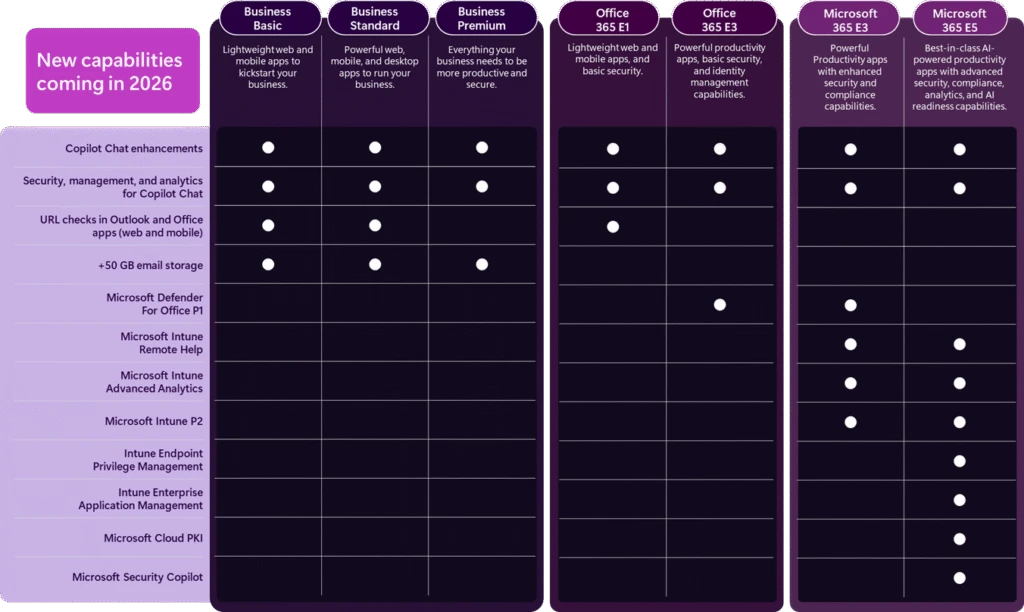
Featurevergleich zwischen neuem Outlook und klassischem Outlook

Quelle: Link

Letzte Aktualisierung: 11. März 2025

Das neue Outlook für Windows bietet Ihnen die neuesten Features, Microsoft Copilot unterstützten Funktionen und ein neues modernes und vereinfachtes Design, mit dem Sie Verbindungen herstellen, organisieren und erledigen können.

Wir haben eine Featureabdeckungsmatrix zusammengestellt, die Ihnen und Ihren Teams hilft, zu verstehen, was verfügbar und bald verfügbar ist, im Vergleich zu dem, was heute in der klassischen Outlook-Umgebung vorhanden ist.

Hinweis: Einige Features sind nur für Personen verfügbar, die ein Geschäfts-, Schul- oder Unikonto in Outlook mit einem qualifizierten Microsoft 365-Abonnement verwenden.

Wir hören uns ihr Feedback aktiv an und nehmen Aktualisierungen und Änderungen an unserer Feature-Roadmap vor, basierend auf ihren Informationen. Wenn Sie Feedback dazu haben, was wir zum neuen Outlook hinzufügen sollten, verwenden Sie bitte den Link In-App-Hilfe > Feedback geben .

Featurevergleich zwischen neuen Outlook- und klassischen Outlook-Versionen

Schlüsseldefinitionen

  • Verfügbar: Das Feature ist verfügbar.
  • Teilweise verfügbar: Das Feature ist verfügbar; Es verfügt jedoch im Vergleich zu anderen Outlook-Versionen möglicherweise nicht über alle vorhandenen Features.
  • Nicht unterstützt: Das Feature wird in der aufgelisteten Outlook-Version nicht unterstützt.
  • Untersucht: Wir überprüfen derzeit Feedback zu diesem Feature.
  • In Kürze: Dieses Feature wird in Zukunft verfügbar sein.

Quelle: Link

Die Fujitsu Technology Solutions GesmbH wird zur Fsas Technologies GesmbH

Und bleibt ein 100%iges Tochterunternehmen von Fujitsu!

Im Rahmen unserer globalen Strategie hat Fujitsu am 1. April 2024 die Geschäftsbereiche Server und Storage in der Fsas Technologies Inc. Group in Japan zusammengelegt. Mit dem Ziel, eine globale Platform-Geschäftseinheit zu bilden, wird der europäische Platform-Geschäftsbereich ab dem 1. April 2025 Teil der Fsas Technologies Inc. Group werden.

Die Umfirmierung erfolgt unter Beibehaltung unserer rechtlichen Identität. Werte, Produktportfolio, Produktnamen, Ansprechpartner und Kontaktdaten bleiben gleich. Es ändert sich lediglich der Name unseres Unternehmens.  

Als Fsas Technologies können und werden wir uns vollständig auf die Bedürfnisse unserer Kunden und Partner konzentrieren – und unsere spezifische Expertise als datensouveräner Technologieführer für Rechenzentrumslösungen und Infrastrukturdienstleistungen nutzen.

Mit dieser Transition zu Fsas Technologies stellen wir neben dem Fujitsu Services Geschäft eine eigene Säule im Fujitsu Konzern dar, profitieren aber gleichzeitig als 100%ige Tochter von der Stärke, den Werten und den Ressourcen unseres japanischen Mutterkonzerns.

Installieren des klassischen Outlook für Windows

Quelle: Link


Applies To
Wenn Sie kürzlich ein neues Windows-Gerät gekauft haben, können Sie das klassische Outlook möglicherweise nicht finden, oder das Symbol wird angezeigt, aber Sie erhalten eine Fehlermeldung, wenn Sie versuchen, es zu öffnen. Die Fehlermeldung besagt möglicherweise, dass Outlook nicht gefunden werden kann, oder sie könnte Folgendes sagen:

  • Wir konnten dies nicht überprüfen und installieren, da sie im Microsoft Store nicht verfügbar ist. Um es zu installieren, laden Sie sie von der Website des Publishers herunter.

Dieses Problem liegt daran, dass ab 2024 bei vielen neuen Geräten das neue Outlook für Windows vorinstalliert ist und das klassische Outlook nicht mehr mitgeliefert wird. Wenn Sie zu diesem Zeitpunkt lieber das klassische Outlook verwenden möchten, steht Ihnen eine eigenständige Version des klassischen Outlook für Windows zur Installation zur Verfügung.

Installieren des klassischen Outlook für Windows

Um eine eigenständige Version des klassischen Outlook für Windows zu installieren, wählen Sie Herunterladen aus und befolgen Sie die Anweisungen, um die Installation abzuschließen.

Herunterladen

Sie können es aus dem Windows Store installieren.

Aus dem Store installieren

Introducing Exchange Online Tenant Outbound Email Limits

Quelle: Link

Introducing Exchange Online Tenant Outbound Email Limits

The_Exchange_Team's avatar

Feb 24, 2025As with all cloud services, Exchange Online imposes service limits to prevent misuse of Exchange Online resources and ensure availability for all users. For example, aside from the High-volume Email offering, Exchange Online doesn’t support bulk or high-volume email, yet until now we’ve mostly used only a per-mailbox daily send limit (known as the Recipient Rate Limit or RRL) to enforce this.

Going forward, we’re introducing new tenant-level outbound email limits (also known as the Tenant External Recipient Rate Limit or TERRL) that are calculated based on the number of purchased email licenses a tenant has or if a tenant has only trial licenses. Enforcement for trial-only and single-seat tenants is already enabled. We’ll continue to enable enforcement for all other tenants in the Exchange Online multitenant standard environment in March, starting with tenants with a small number of licenses, then gradually including all tenants by April.

TERRL rollout schedule

Phase Enable enforcement for tenant group Rollout start date
1 Tenants with <= 25 email licenses March 3, 2025
2 + additional tenants with <= 200 licenses March 10, 2025
3 + additional tenants with <= 500 licenses March 17, 2025
4 + all remaining tenants March 31, 2025

Based on service telemetry, most Exchange Online customers won’t be impacted. A new report (Tenant Outbound External Recipients) will be made available in the EAC by late-February that will show your tenant’s limit. If your organization needs to send more email to external recipients than your limit allows, we recommend using Azure Communication Services email for bulk or high-volume emailing to external recipients.

More Information

The Tenant External Recipient Rate Limit (TERRL) is the maximum number of external recipients a tenant in good standing can send to per day (24-hour sliding window). External recipients are those whose email address domains are not an accepted domain in the tenant. The TERRL establishes base-line outbound sending limits for all tenants, but additional current and future restrictions can also occur due to factors like suspicious sending behavior, sending spam, fraudulent or excessively late payments, etc.

Below are the new maximum tenant external recipient rate limits:

  • Trial tenants: Limited to 5,000 total external recipients per day, regardless of license count.
  • Non-trial tenants: Daily outbound limit is based on the tenant’s purchased email licenses (any Exchange Online or Exchange Online Protection license). More licenses increase the number of external recipients your tenant can send to per day, but at a decreasing rate per license. By late February you’ll find your tenant’s TERRL in the Tenant Outbound External Recipients report in the EAC Reports > Mail flow section. You can also use the following formula to determine your tenant’s TERRL:
500 * (Purchased Email Licenses^0.7) + 9500

Sample limits for tenants with various license counts are shown below:

Number of Purchased Email Licenses Tenant External
Recipient Rate Limit
1 10,000
2 10,312
10 12,006
25 14,259
100 22,059
1,000 72,446
10,000 324,979
100,000 1,590,639

If your tenant exceeds its daily outbound sending limit subsequent messages sent to external recipients will be blocked and senders will receive one of the following bounce messages (also known as Non-Delivery Receipts or NDRs):

  • Trial tenants: 550 5.7.232 – Your message can’t be sent because your trial tenant has exceeded its daily limit for sending email to external recipients (tenant external recipient rate limit)
  • Non-trial tenants: 550 5.7.233 – Your message can’t be sent because your tenant exceeded its daily limit for sending email to external recipients (tenant external recipient rate limit)

Deaktivierung unverschlüsselter E-Mail-Verbindungen am 19.02.2025 – Host Europe

Zur Information von Host Europe – ähnlich bei anderen Providern:

Auszugsweise:

im Dezember 2023 haben wir per E-Mail bereits vorangekündigt, dass eine entsprechende Verschlüsselung in Zukunft notwendig ist, um den E-Mail-Service (IMAP, SMTP und POP3) auf der Classic Hosting Plattform weiter nutzen zu können. Wir werden diese Änderung nun am 19.02.2025 um 10:00 Uhr vornehmen. Einhergehend mit der Deaktivierung der unverschlüsselten E-Mail-Verbindungen werden wir auch die alten TLS Versionen 1.0 und 1.1 aus Sicherheitsgründen abschalten.

Warum ist die Deaktivierung der unverschlüsselten Verbindungen für E-Mail überhaupt notwendig?
Die Deaktivierung der unverschlüsselten Verbindungen für E-Mail ist eine notwendige Sicherheitsmaßnahme, über die wir bereits vorab informiert haben und die wir nun am 19.02.2025 durchführen werden. Damit erhöht sich die Sicherheit, denn Benutzername und E-Mail-Passwort werden dann nur noch verschlüsselt übertragen und können nicht von Dritten abgegriffen werden. Aufgrund der NIS2-Richtlinie (Network and Information Security Directive 2) müssen Unternehmen und Dienstleister, die als wesentliche oder wichtige Einrichtungen gelten, angemessene Sicherheitsmaßnahmen ergreifen. Dazu gehört auch die zwingende Transportverschlüsselung (z. B. TLS), um die Vertraulichkeit und Integrität von Daten zu schützen.

Sollten Sie in Ihrem E-Mail-Programm eine unverschlüsselte Verbindung eingestellt haben, wird diese ab dem endgültigen Deaktivierungstermin am 19.02.2025 nicht mehr funktionieren.

Ich sende E-Mails nicht nur mit einem E-Mail-Programm, sondern z.B. auch mit einem Drucker, Fax, Skript. Muss ich hier auch Anpassungen vornehmen?
Auch in diesem Fall müssen Sie bitte Ihre Anwendung bzw. E-Mail-Einstellungen des Druckers, Fax, etc. auf eine verschlüsselte Verbindung anpassen, damit der E-Mail-Versand auch nach dem 19.02.2025 10:00 Uhr reibungslos erfolgen kann.

Lenovo-NVIDIA-CQ1-2025 Portfolio

Link: NVIDIA RTX-Grafiklösungen im Vergleich

Update: 2025-08-12

Quelle: Link

RTX PRO auf Desktops Link

RTX PRO 6000 Blackwell Workstation Edition

RTX PRO 6000 Blackwell Max-Q Workstation Edition

RTX PRO 5000 Blackwell

RTX PRO 4500 Blackwell

RTX PRO 4000 Blackwell

 New

RTX PRO 4000 Blackwell SFF Edition

 New

RTX PRO 2000 Blackwell

GPU Memory 96GB GDDR7 with ECC 96GB GDDR7 with ECC 48GB GDDR7 with ECC 32GB GDDR7 with ECC 24GB GDDR7 with ECC 24GB GDDR7 with ECC 16GB GDDR7 with ECC
Display Ports 4x DisplayPort 2.1 4x DisplayPort 2.1 4x DisplayPort 2.1 4x DisplayPort 2.1 4x DisplayPort 2.1 4x Mini DisplayPort 2.1 4x Mini DisplayPort 2.1
Max Power Consumption 600W 300W 300W 200W 140W 70W 70W
Form Factor 5.4” (H) x 12.0” (L) dual slot 4.4” (H) x 10.5” (L) dual slot 4.4” (H) x 10.5” (L) dual slot 4.4” (H) x 10.5” (L) dual slot 4.4” (H) x 9.5” (L) single slot 2.7” (H) x 6.6” (L) dual slot 2.7” (H) x 6.6” (L) dual slot
Thermal Double Flow Through Active Active Active Active Active Active

RTX 6000

RTX 5000

RTX 4500

RTX 4000

RTX 4000 SFF

RTX 2000
GPU Memory 48GB GDDR6 with ECC 32GB GDDR6 with ECC 24GB GDDR6 with ECC 20GB GDDR6 with ECC 20GB GDDR6 with ECC 16GB GDDR6 with ECC
Display Ports 4x DisplayPort 1.4a* 4x DisplayPort 1.4a* 4x DisplayPort 1.4a 4x DisplayPort 1.4a 4x Mini DisplayPort 1.4a 4x Mini DisplayPort 1.4a
Max Power Consumption 300W 250W 210W 130W 70W 70W
Form Factor 4.4” (H) x 10.5” (L) dual slot 4.4” (H) x 10.5” (L) dual slot 4.4” (H) x 10.5” (L) dual slot 4.4” (H) x 9.5” (L) single slot 2.7” (H) x 6.6” (L) dual slot 2.7” (H) x 6.6” (L) dual slot
Thermal Active Active Active Active Active Active

A800 40GB Active RTX A6000 RTX A5500 RTX A5000 RTX A4500 RTX A4000 RTX A2000 | RTX A2000 12GB RTX A1000 RTX A400
GPU Memory 40GB HBM2 48GB GDDR6 with ECC 24GB GDDR6 with ECC 24GB GDDR6 with ECC 20GB GDDR6 with ECC 16GB GDDR6 with ECC 6GB | 12GB GDDR6 with ECC 8GB GDDR6 4GB GDDR6
Display Ports Not equipped 4x DisplayPort 1.4a* 4x DisplayPort 1.4a* 4x DisplayPort 1.4a* 4x DisplayPort 1.4a 4x DisplayPort 1.4a 4x Mini DisplayPort 1.4a 4x Mini DisplayPort 1.4a 4x Mini DisplayPort 1.4a
Max Power Consumption 240W 300W 230W 230W 200W 140W 70W 50W 50W
Form Factor 4.4” (H) x 10.5” (L) dual slot 4.4” (H) x 10.5” (L) dual slot 4.4″ (H) x 10.5″ (L) dual slot 4.4” (H) x 10.5” (L) dual slot 4.4” (H) x 10.5” (L) dual slot 4.4” (H) x 9.5” (L) single slot 2.7” (H) x 6.6” (L) dual slot 2.7” (H) x 6.4” (L) single slot 2.7” (H) x 6.4” (L) single slot
Thermal Active Active Active Active Active Active Active Active Active

T1000 | T1000 8GB T600 T400 | T400 4GB
GPU Memory 4GB | 8GB GDDR6 4GB GDDR6 2GB | 4GB GDDR6
Display Connectors 4x Mini DisplayPort 1.4 4x Mini DisplayPort 1.4 3x Mini DisplayPort 1.4
Max Power Consumption 50W 40W 30W
Form Factor 2.713″ (H) x 6.137″ (L) single slot 2.713″ (H) x 6.137″ (L) single slot 2.713″ (H) x 6.137″ (L) single slot
Thermal Active Active Active


KI-Guidelines für KMU (wko.at)

Quelle: Link

KI-Guidelines für KMU

Empfehlungen zum positiven Umgang mit künstlicher Intelligenz

Um kleine und mittlere Unternehmen (KMU) dabei zu unterstützen, das Potenzial von KI-Anwendungen für den eigenen Betrieb zu entdecken und fit für die Nutzung der Schlüsseltechnologie der kommenden Jahrzehnte zu werden, hat die WKO einen umfassenden Leitfaden entwickelt. Er soll bei der Nutzung und Integration von KI-Anwendungen unterstützen und wichtige Aspekte des Einsatzes einfach erklären.

Die enthaltenen Muster-Richtlinien für Mitarbeitende sollen KMU als Grundlage dienen, um individuelle Guidelines zur Nutzung von KI-basierten Anwendungen im Unternehmen zu entwickeln. Sie sollten an die Unternehmenserfordernisse angepasst werden und helfen dabei, eine verständliche Vereinbarung zur Nutzung von KI-Anwendungen mit den Mitarbeiter:innen zu treffen.

PDF jetzt downloaden

KI-Guidelines für Mitarbeitende online erstellen

Das Online-Formular trägt die wesentlichen Punkte einer Richtlinie für Mitarbeitende im Umgang mit künstlicher Intelligenz zusammen und bietet die Möglichkeit, diese maßgeschneidert für Ihr Unternehmen auszuwählen und anzupassen. Nach Fertigstellung und Download des Dokuments kann dieses noch individualisiert und mit dem eigenem Firmenlogo versehen werden.

Jetzt online erstellen

Microsoft Office 2019 – Extended End Date – Oct 14, 2025

Quelle: Link

Microsoft Office 2019

Microsoft Office 2019 follows the Fixed Lifecycle Policy.

This applies to the following editions: Home and Business, Home and Student, Personal, Professional, Professional Academic, Professional Plus, Standard

Support dates are shown in the Pacific Time Zone (PT) – Redmond, WA, USA.

Support Dates

Listing Start Date Mainstream End Date Extended End Date
Microsoft Office 2019 Sep 24, 2018 Oct 10, 2023 Oct 14, 2025

Avoid staying signed in on a public computer

Quelle: Link

Your sign-in experience is changing

The web browser sign-in experience is changing when you sign in to any product or service using your Microsoft account. Starting in February 2025, you will stay signed in automatically unless you sign out or use private browsing.

If you sign in on your own computer, your browser will remember your sign-in information, but if you sign in on a computer, phone or tablet that doesn’t belong to you, or is accessed by other people, you should follow the steps below to use a private browsing window instead.

Private browsing ensures that others won’t be able to:

  • Access your Microsoft account, OneDrive or Outlook.com mailbox.
  • See your search and browsing history.

To sign out from your Microsoft account in a web browser, select your profile picture in the top right corner of the page and select Sign out. Alternatively, you can sign out manually below.

Sign out

Tip: Always close all browser windows after signing out. If you no longer have access to a device where you were signed in, read How to sign out everywhere.

How to start private browsing

All major web browsers offer some form of private browsing mode, which prevents history, cookies, and site data from being saved on your device. Here’s how to access private browsing on some popular browsers.